Sell gift cards on your WooCommerce store
Sell and redeem gift cards on your WordPress store, refund orders as store credit, and sync cards with Clover, Square, and Shopify.


Sell gift cards on your WooCommerce store
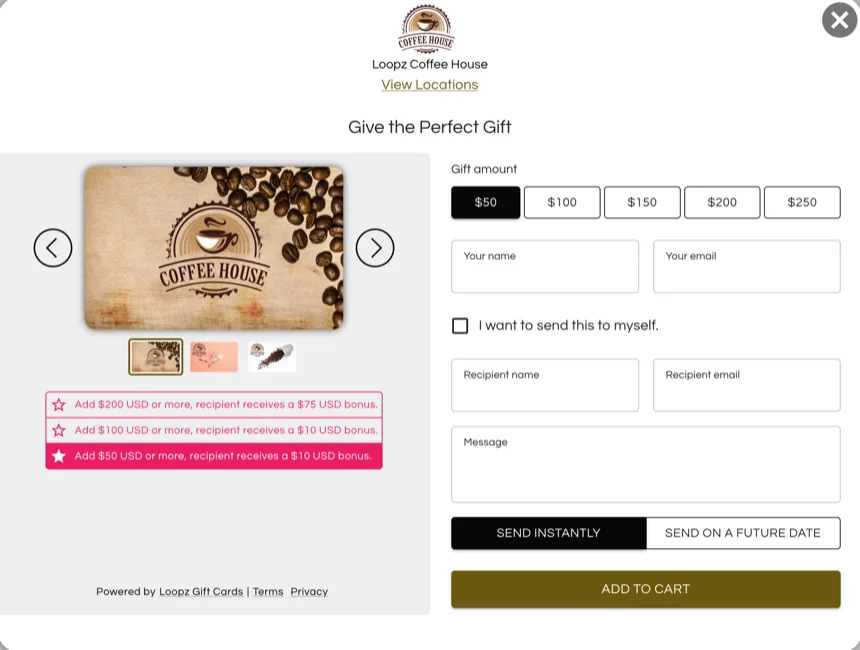
The Loopz plugin creates a gift card product on your store. Customers pick an amount, add a personal message, and pay through your existing WooCommerce checkout. The digital gift card is emailed to the recipient with instructions on how to redeem it at your business.
Redeem gift cards in the cart and at checkout
A redeem section appears on your cart and checkout pages. Customers enter their gift card code, tap Apply, and the balance comes off the order. If the card does not cover the full total, they pay the difference with any payment method your store accepts.
It works with the classic WooCommerce cart and checkout pages and with the new block-based ones, and you choose whether balances can cover shipping and taxes.
Refund orders as store credit
Keep the revenue in your business. From the order screen in your WooCommerce admin, refund all or part of an order as store credit instead of sending the money back to the original payment method.
The customer receives a gift card by email for the refunded amount and comes back to spend it on your store.
Omni-channel gift cards
Sync gift cards between your WooCommerce store and your Clover, Square, or Shopify accounts. Every card shares one balance and can be redeemed at all linked locations, online and at the register.
Start selling gift cards on WooCommerce in minutes
Four steps from the plugin install to your first card redeemed.
Everything you need to run gift cards on WooCommerce
Gift card product created for you
The plugin adds a gift card product to your store with the denominations you choose. Payment runs through your own WooCommerce checkout, with any payment method your store accepts.
Redeem in the cart and at checkout
Customers enter a gift card code on the cart or checkout page and the balance comes off the order. Works with the classic pages and the new block-based cart and checkout.
Control what balances cover
Decide whether gift card balances apply to shipping and taxes, and whether a gift card can be used when the order itself contains gift cards.
Refund as store credit
From the order screen in your WooCommerce admin, refund all or part of an order as store credit. The customer gets a gift card by email and the revenue stays with you.
Personal messages and scheduled delivery
The Send as a gift button lets buyers add the recipient, a personal message, and a delivery date. The gift email goes out on the day they pick.
Customize the experience
Add your branding to the gift form, the gift emails, and the card designs customers choose from, so everything looks like your store.
Sync with your POS and other stores
Connect Clover, Square, Shopify, or another WooCommerce store to the same program. One card, one balance, redeemable everywhere you sell.
Bring your existing gift cards
Already have outstanding gift cards? We import active balances into your program so they can be redeemed on your WooCommerce store from day one.
Track performance
See sales, redemptions, and outstanding balances in your dashboard, manage every card, and download reports for your accountant.
Simple pricing for your WooCommerce store
14-day free trial. No contracts, cancel anytime.
Lite
Standard
Advanced
Pro
Ready to launch gift cards on WooCommerce?
One gift card program across your point of sale and online store, always in sync.